AC · Plumbing · Electricalby Service ProCallFree trial

For growing companies

Get off the spreadsheet

The system that got you to five trucks won't get you to fifteen. Here is what is slowing you down, and how to move to software that runs like the big shops.

AC technician greeting a homeowner at the front door
Download PDF

What slows a growing shop

Your work is good. Your systems are full.

Most small companies don't stall because of the trade. They stall when the office can't keep up with the trucks.

Spreadsheets

You can only run so much on one file.

  • One person knows how it works, and it lives on one computer.
  • Every job gets typed in two or three times.
  • Your tech calls the office for the address, the gate code and the history.
  • Nothing reminds you that an estimate is open or a tune-up is due.
  • By the time you see the numbers, the month is over.

Too little technology

The work outgrew the tools.

  • Paper tickets come back days after the job.
  • Invoices go out late, so money comes in late.
  • Calls go to voicemail when everyone is on a job.
  • Customers get no reminder and no heads-up, so they aren't home.
  • No one can see the whole day in one place.

Too few people

You can't hire your way out.

  • Every trade is competing for the same skilled workers.
  • Each year, the U.S. expects about 40,600 HVAC, 42,000 plumbing and 72,700 electrician openings.
  • The owner still answers phones, dispatches and does the books.
  • Good techs choose shops with better tools and a clear path.
  • Each tech you have needs to get more done in a day.

Openings: U.S. Bureau of Labor Statistics, Occupational Outlook Handbook, outlook for 2025-35. See Benchmarks.

Check yourself

Signs you've outgrown it

  • Only one person can tell you what's on tomorrow's schedule.
  • You've double-booked a customer or sent a tech to the wrong address.
  • You can't quickly list every system older than ten years.
  • Invoices wait until someone has time.
  • Estimates go out, and no one follows up.
  • You couldn't take a week off without the business slowing down.
  • You don't know your close rate or average ticket by tech.

Two or more? You're ready.

What the spreadsheet costs you

About this much a year

Your numbers. This is an estimate, not a promise.

Step up

What the big leagues actually do

Large shops aren't smarter. They have one system, and everyone uses it the same way. You can have that with five techs.

 On the spreadsheetOn ProCall Field
BookingA notebook, sticky notes or a shared sheetBook into one calendar, with the customer's history on screen
DispatchCalls and texts to each techA dispatch board everyone sees, with help assigning the day
In the fieldPaper tickets and calls to the officeA tech app with the job, history, photos and payment
EstimatesWritten up later, if there is timeOptions built on site from your price book, and open ones tracked
Getting paidInvoices at the end of the weekInvoice and take payment when the job is done
CustomersWhatever is in the sheetEquipment, jobs, invoices and plans on one record
Follow-upWhen someone remembersAutomatic reminders, on-the-way texts, renewals and follow-ups
Your numbersAt month end, if you can find themKPIs, reports and tech performance as work happens
New hiresLearn by following someone aroundTraining tracks, a manual and a standard way of doing the job

Field plans start at $149 a month for 1-5 technicians, plus one-time setup. Every office login is included.

How to move

What it looks like

Screens from ProCall Field, set up for a sample AC and plumbing company. Click any screen to see it full size.

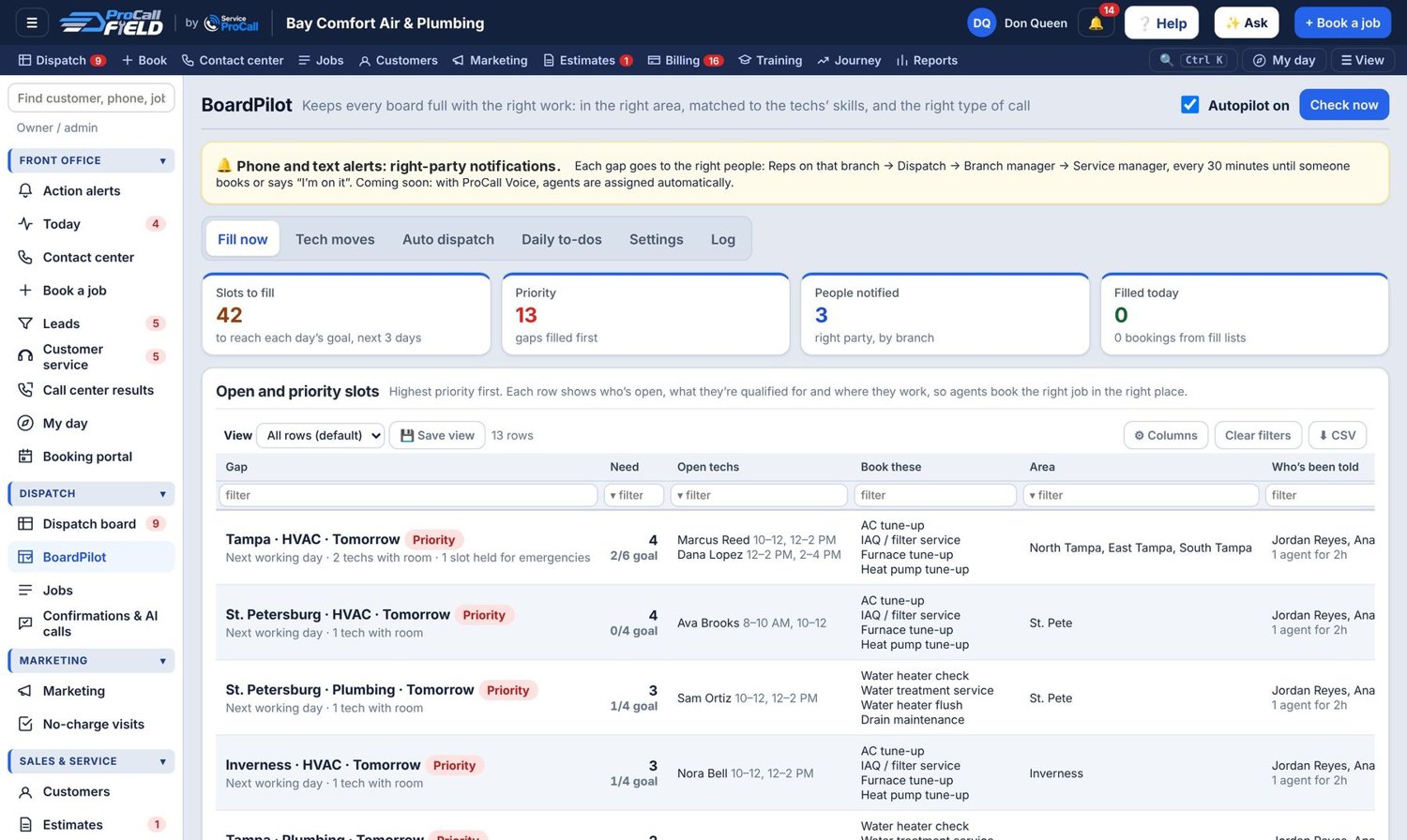
ProCall Field: BoardPilot
BoardPilot. Finds the open slots for the next three days by area, trade and tech skills, and tells the right people to fill them.
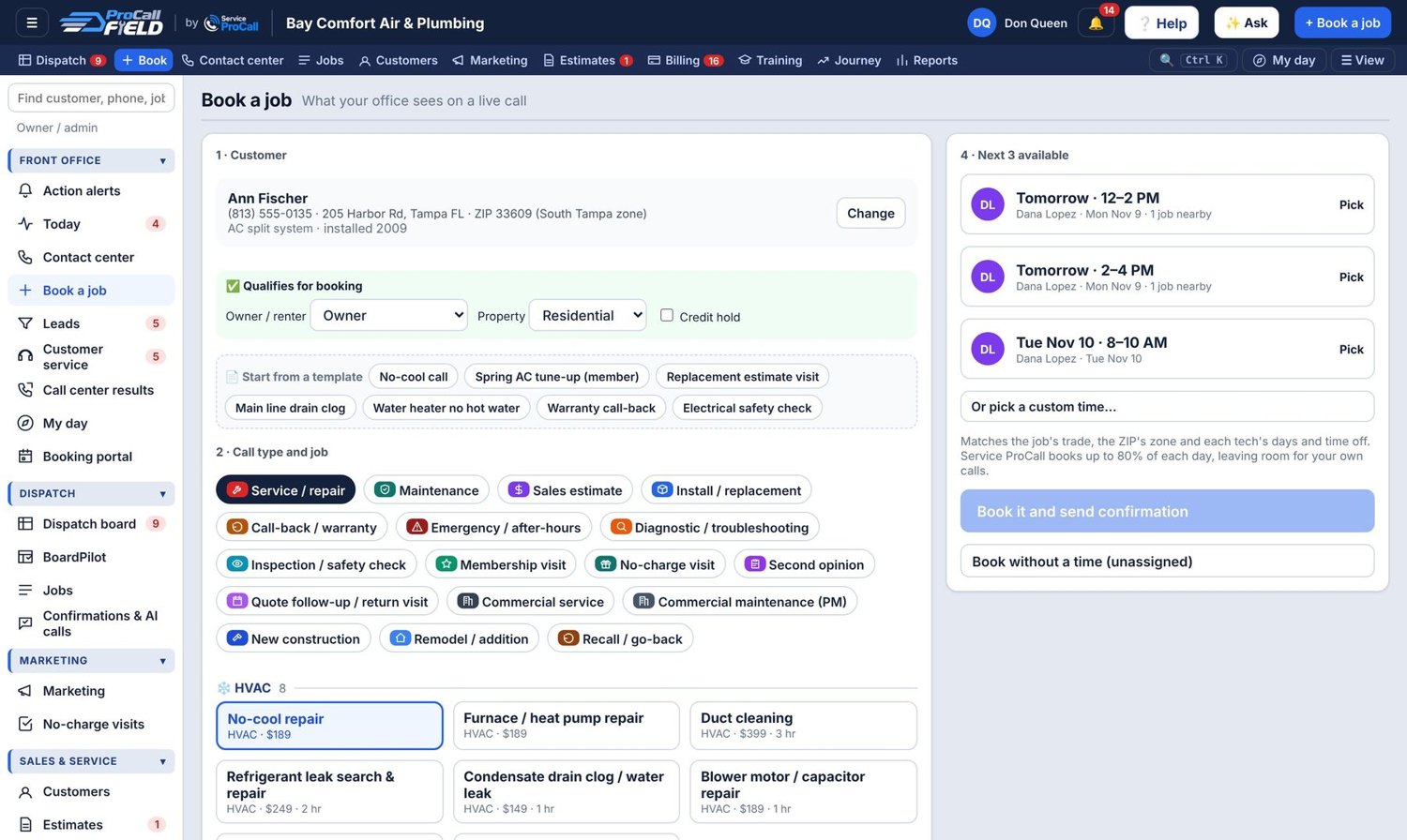
ProCall Field: Book a job
Book a job. The customer, the call type and the next three open times on one screen, so the office books in under a minute.
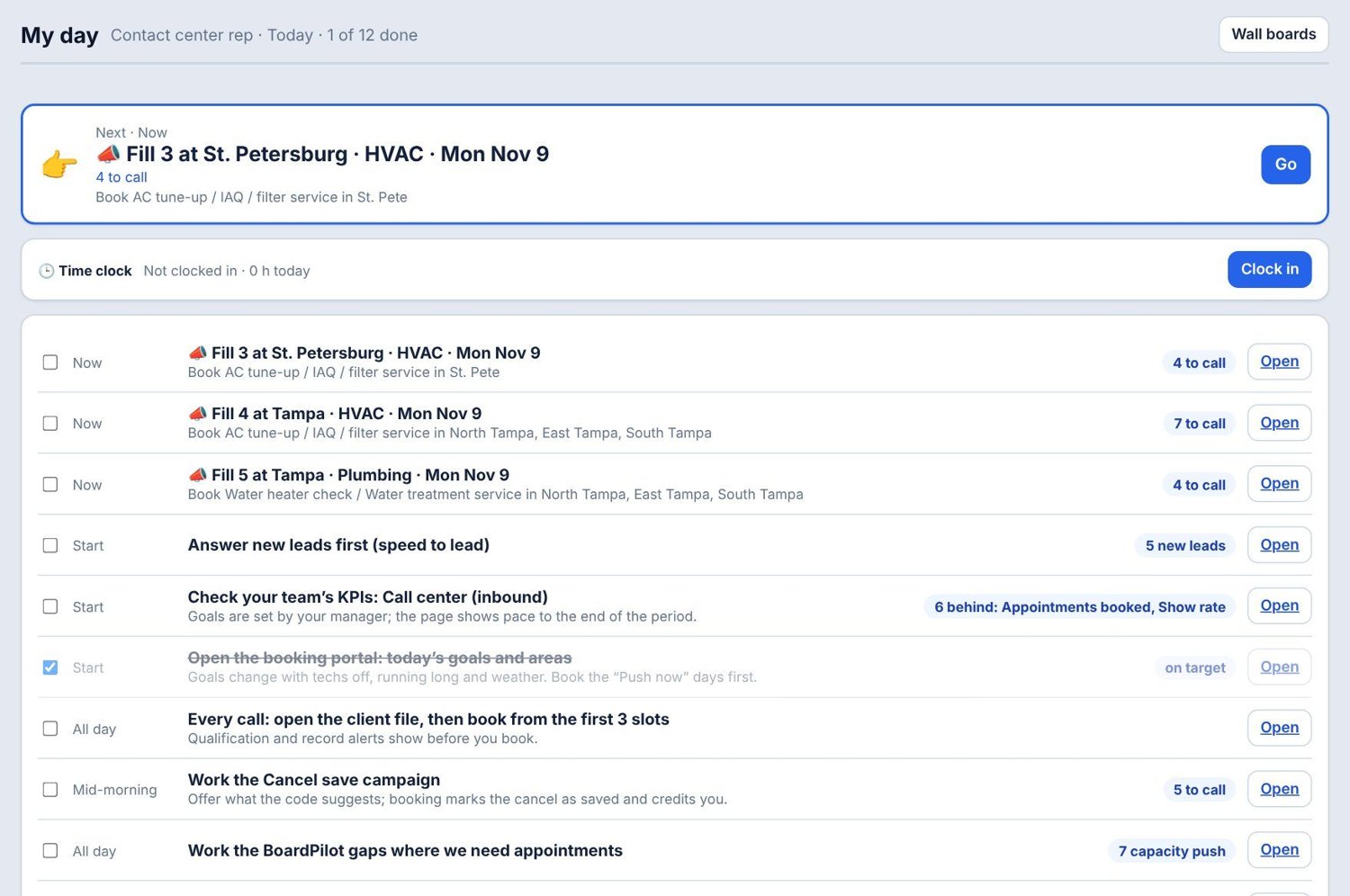
ProCall Field: My day
My day. Each person's work for the day, in order, starting with the slots that fill the board.
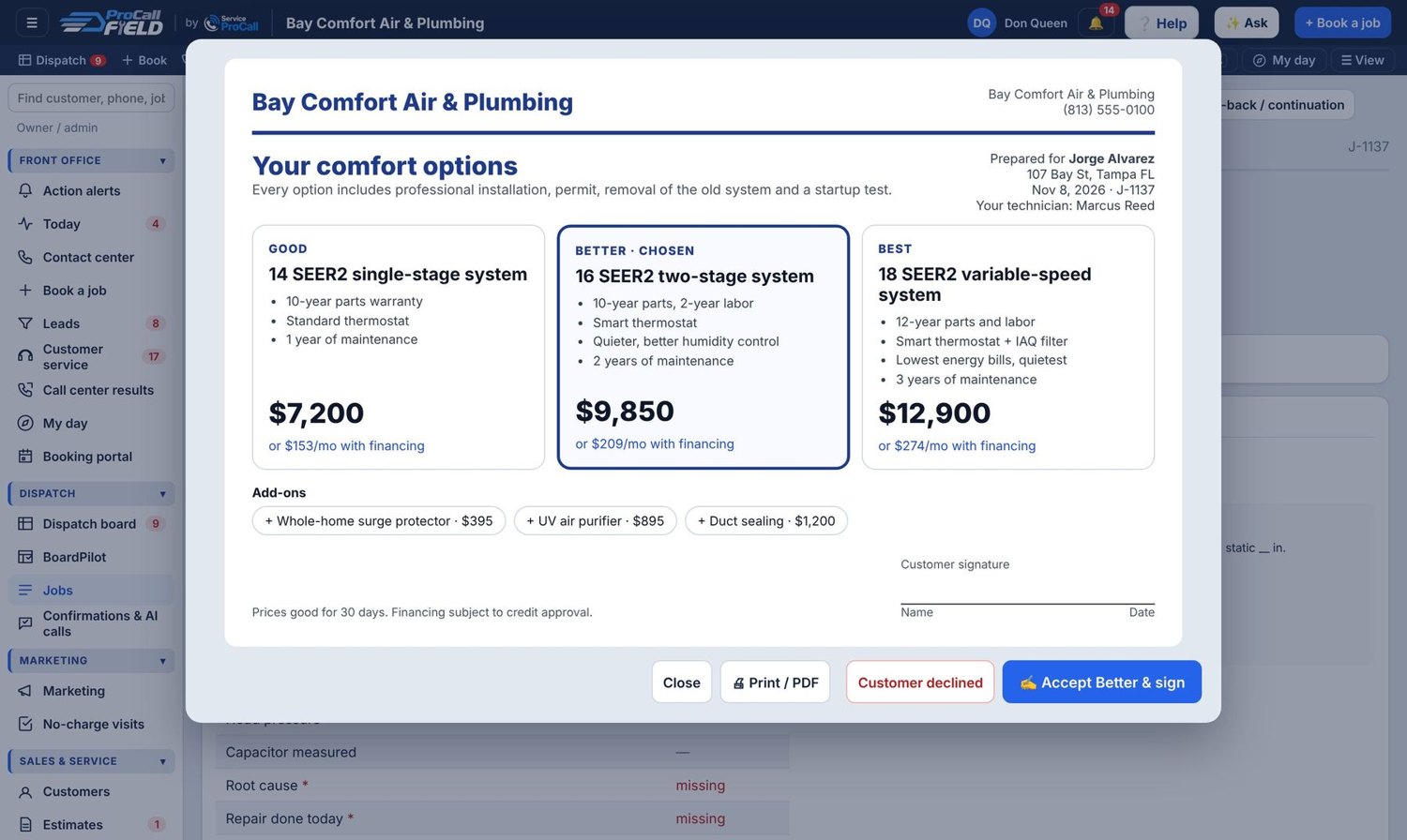
ProCall Field: Good, better, best
Good, better, best. The options sheet techs present in the home, with financing per month and a signature to accept.

From spreadsheet to ProCall Field in your 14-day trial

A new account opens on a 14-step setup. Your progress saves as you go, you can skip and come back, and every step has a way to ask for help.

  1. Days 1 and 2: Set up the basics. Start your trial. Enter your company, trades, service area, hours and arrival windows. Start your texting registration now too, because it has to be approved before texts can go out.
  2. Days 3 and 4: Add your people and prices. Add technicians and office logins. Set a price for each job type and up to three maintenance plans. Every office login is included.
  3. Days 5 and 6: Bring in your customers. Clean your sheet, save it as CSV and import it. The tool matches your columns, shows a preview and skips duplicates.
  4. Days 7 and 8: Connect the money and the messages. Connect payments and run a $1 test. Finish the texting setup, then choose which automatic texts to turn on.
  5. Days 9 and 10: Train the team. Give everyone their role track. Run practice jobs from booking to payment on a slow afternoon.
  6. Days 11 to 14: Run real jobs. Pick one tech or one day of the week, and run those jobs only in Field. When that works, move everyone over and stop updating the sheet.

Before you import

Clean your sheet first

  1. Save a copy of the original and keep it.
  2. One customer per row. Keep extra addresses in a separate list.
  3. One thing per column. Split street, city, state and ZIP.
  4. Fix phone numbers. Field uses them to spot duplicates, and your texts depend on them.
  5. Delete junk rows, such as subtotals, blanks and color-coded notes that only you understand.
  6. Add what you know about equipment: type, brand, model, serial number and install year. That list becomes your next marketing campaign.
  7. Save as CSV.

A clean customer file

Name,Phone,Email,Street,City,State,ZIP,Notes
Jane Smith,8135550100,jane@example.com,100 Main St,Tampa,FL,33635,Gate code 1234

Import in this order

  1. Customers
  2. Equipment
  3. Memberships
  4. Price book
  5. Job history
  6. Invoices

Already on software? Field also takes the standard exports from the major field service platforms.

Make the switch stick

What separates the shops that finish

Pick a cutover date

After that date, new work goes only in Field. Two systems at once is how the old one survives.

Name one owner

One person is responsible for setup, questions and getting everyone trained. It doesn't have to be you.

Don't wait for perfect

Start with a working price book and fix it as you go. You'll learn more in a week of real jobs.

When you can't find people

Get more out of the team you have

Need a hand moving?

Start on your own, or talk to us first and we'll look at where you are today.

Best practices: running on spreadsheets

Make it a habit

What good looks like

  • One system for customers, jobs, estimates and invoices.
  • Everyone sees the same board, live.
  • Customer history available on every call and every visit.

The habits

  1. List what lives where today before you pick software.
  2. Clean your spreadsheet before you import it.
  3. Move one thing at a time: customers, then scheduling, then estimates and invoices.
  4. Train each role on the few screens they use.
  5. Set a date to stop using the old sheet, and keep to it.
  6. Review after 30 days and fix what people work around.